
Mock only what isn’t ready
Send some paths to mocks and proxy everything else to real upstreams, using regex matchers across several upstreams.
Self-hosted mock server · HTTP & Kafka
Record the APIs you depend on, turn that traffic into editable mock templates, and replay requests to check every change. One JAR, running on your machine.
# 1. Start the server
$ java -jar fantastic-mock-1.0.5.jar

# 2. Open the workspace
http://localhost:8080/__admin/

# 3. Point your app at the mock
API_BASE_URL=http://localhost:8080
UI
Built from the same components as the app, running on sample data in your browser.
In create-order-v1, open Send response and edit the body.
Press ▶ Test (skip delays) to run your unsaved draft against the example request.
Save, open Traffic logs, and retry a request to see your change.
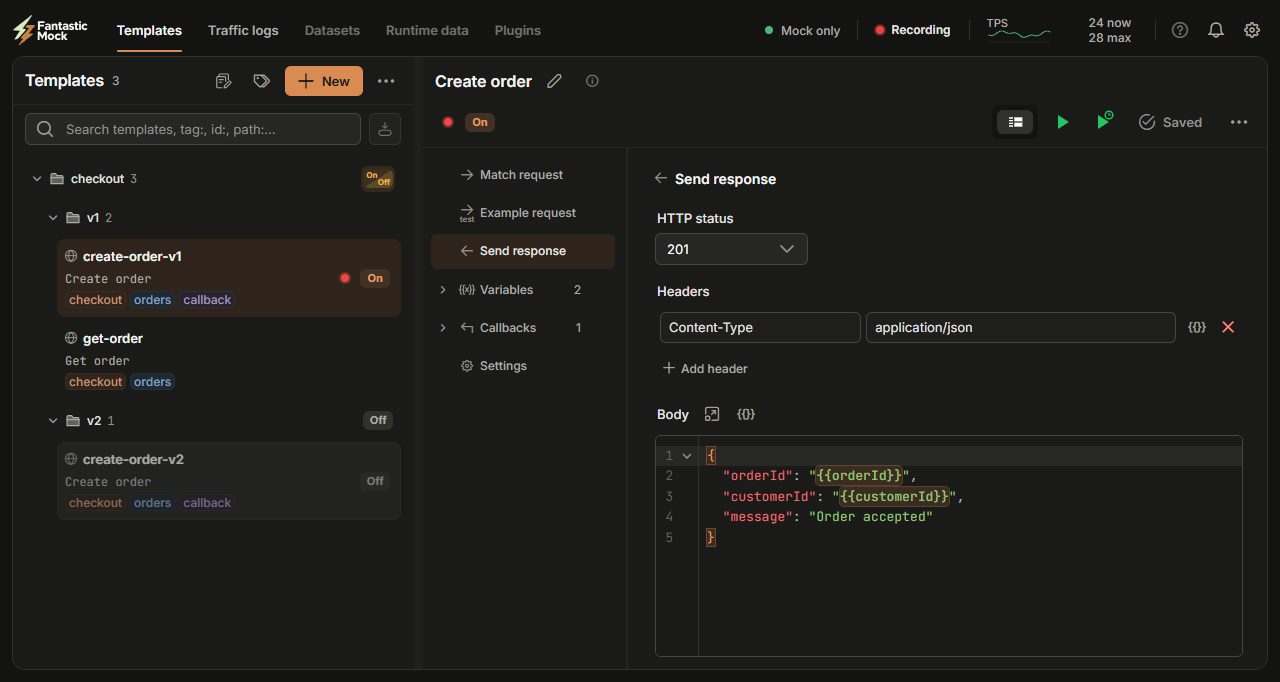
The workspace is built for larger screens. Open it on a laptop or desktop to try it with sample data.
Open the workspace anywayFeatures
Stop writing mock responses by hand. Capture what the real service returns, then shape it into a template.
Proxy real HTTP requests through Fantastic Mock and record the responses.
Create templates from all recorded traffic, a selection, or a single request.
Changing values like IDs are detected and turned into typed variables, linked between request and response.
Adjust the response, test the draft, and replay the original request to confirm the result.
Automatic template generation is available for HTTP traffic.
GET /api/orders/{id} requests become one parameterized template, which then answers a new order with the real API offline. Captions and click highlights added.A static response is the easy part. Fantastic Mock handles partial rollouts, state, asynchronous callbacks, and large template libraries.
Send some paths to mocks and proxy everything else to real upstreams, using regex matchers across several upstreams.
Serve rows from CSV files or a PostgreSQL, MySQL, or MariaDB database, and share values between requests with runtime data: put, get, and poll.
Answer an HTTP request and publish a Kafka event from the same template. Reuse extracted values in both, and send a Kafka response several times or until a condition is met.
Run a sample request against your unsaved draft and inspect the response, at once or with its delays. Edits apply without restarting the server.
Search templates and traffic by any field, with regex and AND/OR filters, and pin the searches you reuse. Choose the table columns you need.
Group templates in folders, label them with tags, and switch versions on or off in bulk. Mute noisy templates while they keep responding.
Monitoring is built in, not bolted on.
/actuator/prometheus and use the prebuilt Grafana dashboard.Architecture
A protocol decodes the request, the core matches a template and renders the response, and whatever you don’t mock is routed to the real API. Plugins extend each stage.
Extensibility
When a template isn’t enough, write a little code. Run Fantastic Mock on a JDK and it compiles your code for you.
.java file in plugins-src: a response handler, a variable generator, or a template function you call as {{name(args)}}. Fantastic Mock compiles and loads it when it runs on a JDK. Dependency JARs go in plugins-lib.Server runs a JRE? Fantastic Mock can compile plugins only on a JDK. On a JRE, compile them yourself on a machine with a JDK: handlers, generators and functions against the Fantastic Mock JAR, protocol plugins against the protocol API JAR. Then copy the result to the server. The built-in documentation has the exact commands.
import com.fantasticmock.plugin.CustomVariableGenerator;
import com.fantasticmock.template.model.TemplateVariable;
import java.time.LocalDateTime;
import java.time.format.DateTimeFormatter;
import java.util.Map;

public class CurrentTimeVariableGenerator
    implements CustomVariableGenerator {

  private static final DateTimeFormatter FORMAT =
      DateTimeFormatter.ofPattern("yyyy-MM-dd'T'HH:mm:ss.SSS");

  @Override
  public String name() {
    return "currentTime";
  }

  @Override
  public String generate(TemplateVariable variable,
                         Map<String, String> variables) {
    return LocalDateTime.now().format(FORMAT);
  }
}
Performance
WireMock, MockServer, and Fantastic Mock’s two HTTP listeners (the built-in Jetty one and the Netty plugin) across twelve HTTP workloads, then at a fixed request rate and with delayed callbacks, each mock limited to one CPU.
Each user sends its next request as soon as the previous one is answered, so every mock works as fast as it can.
| Workload | WireMock 3.13.2 | MockServer 8.0.0 | Fantastic Mock · Jetty 1.0.2 · built-in listener | Fantastic Mock · Netty 1.0.2 · http-netty plugin 1.2.0 |
|---|---|---|---|---|
| Simple responseFixed JSON body for a GET request. | 2,806 | 11,797 | 8,084 | 29,951 |
| Request matchingMatches a nested customer ID and action in a JSON POST body. | 2,656 | 9,601 | 7,229 | 25,387 |
| Dynamic responseInserts an ID from the query string into the JSON response. | 2,124 | 6,708 | 7,679 | 29,112 |
| CorrelationFetches a token, then reuses it in a second request. Both requests are measured. | 2,079 | 6,642 | 7,248 | 29,241 |
| 1 KB responseFixed 1,024-byte JSON response. | 2,832 | 11,154 | 8,327 | 26,206 |
| 10 KB responseFixed 10,240-byte JSON response. | 2,725 | 10,022 | 7,792 | 22,029 |
| 100 KB responseFixed 102,400-byte JSON response. | 2,004 | 5,173 | 4,870 | 10,264 |
| RoutingPicks one of 100 templates across 20 paths by path and query parameter. | 3,355 | 7,248 | 7,774 | 29,353 |
| 5 variablesCopies 5 query parameters into the JSON response. | 2,412 | 6,164 | 7,212 | 28,631 |
| 10 variablesCopies 10 query parameters into the JSON response. | 1,539 | 5,574 | 6,897 | 26,152 |
| 20 variablesCopies 20 query parameters into the JSON response. | 930 | 4,718 | 5,914 | 23,669 |
| 50 variablesCopies 50 query parameters into the JSON response. | 437 | 3,315 | 4,381 | 18,013 |
The Netty plugin leads every workload at both load levels. The built-in Jetty listener is ahead of WireMock in every workload. Against MockServer it is ahead where the response is built from the request (dynamic, correlation, routing, and all four variable workloads) and behind on fixed responses. The Netty plugin also retains the least heap in every workload: about 30 MiB at both load levels, where the other three hold 145–360 MiB at 500 users. At full load every mock uses its whole CPU; the Netty plugin dips to 92–96% on the 100 KB responses.
Measured on two virtual machines, the mock on one and the load generator on the other; each value is the median across the rounds. Request logging was off in every product. Results describe this setup, not a general ranking.
Every mock receives the same steady stream of requests, at about 50% and 80% of what the slowest one sustained at full load, so response times compare like for like.
| Workload and rate | WireMock 3.13.2 | MockServer 8.0.0 | Fantastic Mock · Jetty 1.0.2 · built-in listener | Fantastic Mock · Netty 1.0.2 · http-netty plugin 1.2.0 |
|---|---|---|---|---|
| Simple response at 1,400 req/sFixed JSON body for a GET request. | 1.17 ms | 0.96 ms | 0.51 ms | 0.49 ms |
| Simple response at 2,200 req/sFixed JSON body for a GET request. | 84.78 ms | 1.48 ms | 0.61 ms | 0.50 ms |
| Routing at 1,700 req/sPicks one of 100 templates across 20 paths by path and query parameter. | 1.07 ms | 1.00 ms | 0.54 ms | 0.48 ms |
| Routing at 2,700 req/sPicks one of 100 templates across 20 paths by path and query parameter. | 138.41 ms | 1.76 ms | 0.71 ms | 0.46 ms |
| 20 variables at 460 req/sCopies 20 query parameters into the JSON response. | 2.40 ms | 1.08 ms | 0.57 ms | 0.63 ms |
| 20 variables at 740 req/sCopies 20 query parameters into the JSON response. | 407.52 ms | 1.25 ms | 0.65 ms | 0.54 ms |
At about half the slowest mock’s rate, all four keep up. MockServer and both Fantastic Mock listeners answer 95% of requests within 1 ms, the smallest step the load generator records; WireMock takes 2–5 ms. The Netty plugin has the lowest average in five of the six cases (0.46–0.63 ms). The Jetty listener has the lowest p99 in every case (2–8 ms), against 8–10 ms for the Netty plugin and 4–40 ms for MockServer. At about 80%, WireMock falls behind the request rate in all three workloads, so its numbers there include time spent queueing; the other three still answer 95% of requests within 1 ms.
The same rate costs each mock a different amount of work. The Netty plugin uses the least CPU in every case, 12–27% of its one CPU, against 16–55% for the Jetty listener, 16–46% for MockServer, and 53–99% for WireMock. It also retains about 29 MiB of heap where the others hold 120–230 MiB, and spends the least time in garbage collection.
Measured on the same two virtual machines. Each value is the median across three rounds, and none of the 13.5 million requests failed.
Each request is acknowledged at once, and the mock sends an HTTP POST after a delay. Users send the next request as soon as the last one is acknowledged, so every mock runs at full CPU.
| Callback delay | WireMock 3.13.2 | MockServer 8.0.0 | Fantastic Mock · Jetty 1.0.2 · built-in listener | Fantastic Mock · Netty 1.0.2 · http-netty plugin 1.2.0 |
|---|---|---|---|---|
| 5-second delayEach request is acknowledged at once; the mock sends an HTTP POST 5 seconds later. | 845 | 1,625 | 2,968 | 5,788 |
| 10-second delayEach request is acknowledged at once; the mock sends an HTTP POST 10 seconds later. | 898 | 1,585 | 2,852 | 5,879 |
| 60-second delayEach request is acknowledged at once; the mock sends an HTTP POST 60 seconds later. | 928 | 639 | 2,972 | 5,163 |
The Jetty listener accepts about 2,800–3,000 triggers per second and delivers every callback, the 95th percentile within about half a second of its delay. The Netty plugin accepts about twice as many (5,100–5,900) and also delivers every callback, but later: the 95th percentile arrives 1.5–8 seconds after a 5-second delay and about 30 seconds after a 60-second one, where its queue of waiting callbacks reaches its 500 MiB limit and it refuses 5–21% of requests with HTTP 503 rather than queue more. WireMock accepts 760–930 triggers per second, fails up to 8% of requests, and at 500 users misses up to 5% of callbacks. MockServer accepts more triggers than it can send callbacks for: by the end of the run 41–44% had arrived at the 5- and 10-second delays, and about 14% at 60 seconds.
The Netty plugin’s failed requests are refusals, not errors. All of them are HTTP 503 responses at the 60-second delay; it has none at 5 or 10 seconds. Fantastic Mock keeps at most 500 MiB of callbacks waiting to be sent, its default limit, and once that is full it answers 503 with Retry-After rather than use more memory. Holding every trigger for 60 seconds at the plugin’s rate fills it: the queue stood at that limit, about 358,000 callbacks, in every 60-second round. The Jetty listener accepts about half as many triggers, peaks near 270 MiB, and is never refused. No callback failed or was lost, and every trigger the plugin accepted got its callback. In this test a refused user sends again at once, which is why the refusals add up.
Every mock uses its whole CPU here, so memory and garbage collection tell them apart. After a collection WireMock retains 90 MiB–1.2 GiB and the Jetty listener 75 MiB–1.4 GiB, more as the delay grows. The Netty plugin retains 1.7–1.9 GiB and spends 9–11% of the time in GC pauses, more than either. MockServer retains 1.9–2.1 GiB at the shorter delays and fills its whole 3 GiB heap at the 60-second delay, where a third of the time goes to GC pauses.
This is an overload test. Triggers arrive as fast as each mock acknowledges them, so every mock runs at full CPU, and the numbers show how each behaves when saturated, not a rate it can sustain. The Netty plugin’s delivery rate was above half of what the callback receiver handled in calibration, so the benchmark flags its delivery times as possibly limited by the receiver. Each value is the median across three rounds.
One logical CPU and a fixed 3 GiB heap per mock, on a virtual machine that runs one mock at a time, each case in a fresh JVM. JMeter runs on a second virtual machine with four CPUs and a 1.5 GiB heap, so HTTP/1.1 keep-alive traffic crosses the network between them. Both Fantastic Mock columns use the same JAR and templates; only the HTTP listener differs.
Java 21 · JMeter 5.6.3 · 100 or 500 concurrent users · 10-second ramp · 60-second warm-up · 120-second measurement · three rounds, with the order of the mocks rotated.
Throughput counts successful HTTP requests, and every response body is checked. Average latency is the mean full response time of successful requests in the 120-second window, excluding warm-up. p95 is the time within which 95% of successful responses completed. Each user sends its next request as soon as the previous one is answered, so latency here is latency at full load. Every value is the median across the rounds. Body matching compares the same two JSON fields in every product.
CPU is the processor time the mock’s process used, as a share of its one CPU. Heap after GC is the heap still occupied right after a garbage collection, at its highest point in the measured window: an upper bound on what the mock retains. GC pauses is the share of the measured window the JVM spent stopped for garbage collection. RSS is the peak memory of the whole process; every mock runs with the same fixed 3 GiB heap, so RSS mostly reflects that setting and differs little between mocks.
The same test plans, with requests sent at random intervals at a fixed rate that is identical for every mock, over up to 500 connections. The rates are about 50% and 80% of the throughput the slowest mock sustained at full load in the same workload. A mock that answers more slowly than requests arrive is marked “Fell behind”: its latency then includes time spent queueing. JMeter records whole milliseconds, so 1 ms means “within 1 ms”.
60-second warm-up · 120-second measurement · three rounds.
Each request triggers one HTTP POST to a receiver on the load-generator machine after 5, 10, or 60 seconds, and each user sends its next request as soon as the previous one is acknowledged. Accepted counts successful trigger requests. Delivered is the share of those whose callback had arrived when the run ended; the run waits beyond the delay for outstanding callbacks. Lateness is how long after its delay the 95th-percentile callback arrived, among the callbacks that did arrive.
No mock sent a duplicate callback. The benchmark’s strictest check also fails a round for any callback it did not expect. By that check the Netty plugin passed 13 of 18 rounds and the Jetty listener 6 of 18, where the others had up to 336 unexpected callbacks among roughly half a million; WireMock and MockServer passed none. MockServer’s CPU and RSS in this test rest on fewer than half the usual once-a-second samples.
Support us
Everything on this page is free to download and use, with no account or license key. If Fantastic Mock saves you time, you can support its development with a one-time contribution.
Choose €5, €15, €50 or your own amount on PayPal’s checkout page, then pay with PayPal or a card.
Payments are processed by PayPal. The button opens PayPal’s checkout in a new tab.
Get started
Download the JAR, run it with Java 21 or later, and open the workspace. Documentation is built into the app. Open it from the question-mark menu in the header.
Download Fantastic MockFantastic Mock is proprietary software, available at no charge.
$ java -jar fantastic-mock-1.0.5.jar

# Workspace and documentation
http://localhost:8080/__admin/

# Mock traffic is served on the same port
http://localhost:8080/
Yes. Fantastic Mock is proprietary software, available at no charge. You don’t need an account or a license key.
Java 21 or later. Run the JAR with java -jar, open http://localhost:8080/__admin/, and send mock traffic to the same port.
A JRE runs Fantastic Mock. You need a JDK on the server only if you want Fantastic Mock to compile your Java plugins for you. With a JRE, compile plugins yourself on a machine with a JDK, against the Fantastic Mock JAR for handlers and generators or the protocol API JAR for protocol plugins, and copy them to the server. The built-in documentation walks you through it.
As JSON files in local folders you configure. You can use several folders and keep them in version control alongside your code.
HTTP and Kafka are built in. Protocol plugins add others: WebSocket and gRPC plugins are built on the same SDK you can use for your own protocols.
Besides the benchmark results, Fantastic Mock includes a full workspace UI, template generation from recorded traffic, Kafka callbacks, and datasets in a single JAR.
Didn’t find your answer? Send us a message.
Contact
A question about Fantastic Mock, help with your setup, or an integration you’re planning? Send a message and we’ll reply by email.
Who is responsible. אנבייר אלכסיי, based in Israel, operates this contact form for Fantastic Mock. To contact the operator about your information, select in this form.
Your choice. Providing information is voluntary; you have no legal obligation to submit this form. We need your email address and message to receive and answer your enquiry. If you do not provide them or agree to this use, you cannot send a message through this form. You can still browse the site and download the software.
What we use and why. We use your email address, selected topic, message, and a record of your agreement to handle your request and related correspondence. We do not subscribe you to marketing. Your IP address and verification data are also processed to limit spam and secure the form.
Who receives it and where. The operator handles enquiries from Israel. The form service is hosted by in Germany. processes email in to deliver and store our correspondence. These providers process information for hosting and email delivery; information is transferred between the stated countries for these purposes. We may also disclose information when legally required.
How long. We retain enquiries and their agreement records for up to days after the enquiry is closed, unless a legal obligation or legal claim requires longer retention. Spam-verification challenges expire after five minutes. Temporary abuse-prevention counters are cleared within 16 minutes; they do not contain your message. The form service does not store submissions in a separate database.
Your rights. You may request access to and correction of personal information about you held in our database, subject to applicable law. You may also ask us to delete information or withdraw your agreement to future optional processing; we will explain any information we must retain. Where applicable, you also have rights under EU data-protection law, including the right to complain to a supervisory authority. We may need to verify your identity before fulfilling a request.
Spam protection. ALTCHA runs a computational check in your browser and verifies the result on our server. This integration does not send your submission to ALTCHA or use tracking cookies. Browser interaction tracking is disabled.